

A small business needs four things: a register of what it owns, a named holder for anything portable, a signature when equipment is issued, and a reminder before warranties expire. Everything else can wait until you have a reason for it.
Most of the advice written about asset management assumes a dedicated owner, a rollout plan and a governance forum. If you're a thirty-person business with a hundred and forty items, none of that applies to you and following it will stall the project.
So here's the version that fits. It takes an afternoon.
What to track, and what to leave
Two questions decide it. Does it move, and would you notice it gone this week?
|
Item type |
Track individually? |
Why |
|---|---|---|
|
Laptops, phones, tablets |
Yes |
Portable, valuable, issued to people |
|
Monitors, docks, chargers |
Yes |
Cheap individually, and the most commonly unreturned |
|
Power tools, test equipment |
Yes |
Moves between people and jobs |
|
Cameras, AV, instruments |
Yes |
Shared, valuable, condition matters |
|
Desks, chairs, fixed fittings |
Only for insurance value |
Doesn't move, generates no useful history |
|
Consumables and stationery |
No |
Different problem entirely — that's stock, not assets |
The row people get wrong is the second one. Chargers and docks feel too cheap to bother with, so they're left off, and then they're the things nobody ever gets back. A laptop comes home because it's obviously company property. Three chargers don't.
The afternoon
- Start from what you have. Whatever list exists — a spreadsheet, a purchase folder, an email thread. Export it. Don't start from scratch.
- Decide your locations. For most small businesses this is genuinely just: office, store, and home for remote staff. Don't build a hierarchy you don't need.
- Import, then tag the movers. Print QR labels on ordinary address stock, stick them on, scan each one once to bind label to record. Start with laptops and tools; the desks can wait.
- Record who has what, today. This is the bit that takes longest and matters most. Walk around and ask.
- Set warranty dates on anything under cover. Ten minutes, and it's usually the first thing that pays for itself.
That's it. You now have a register that's accurate today, and the question is only whether it stays that way.
What to skip, at least for now
- Custom fields. You'll want two eventually. You don't need eleven on day one, and every one you add is a field somebody has to fill in.
- Depreciation, unless your accountant has asked. It's useful later for repair-or-replace calls; it isn't urgent.
- Approval workflows. With thirty people, asking someone is faster than routing a request.
- Bookings, until two people have actually wanted the same thing on the same day. You'll know when that happens.
- Integrations. Later, and only if something specific needs the data.
The four things that actually prevent problems
Everything above is setup. This is the part that changes outcomes.
|
Practice |
Effort |
What it prevents |
|---|---|---|
|
Named holder on anything portable |
None, once set up |
'I think Dan has it' |
|
Signature at handover |
15 seconds |
Disputes, and unreturned kit at departure |
|
List of holdings at offboarding |
None — it's generated |
The single biggest loss event you have |
|
Reminder before warranty expiry |
10 minutes, once |
Paying for repairs you were covered for |
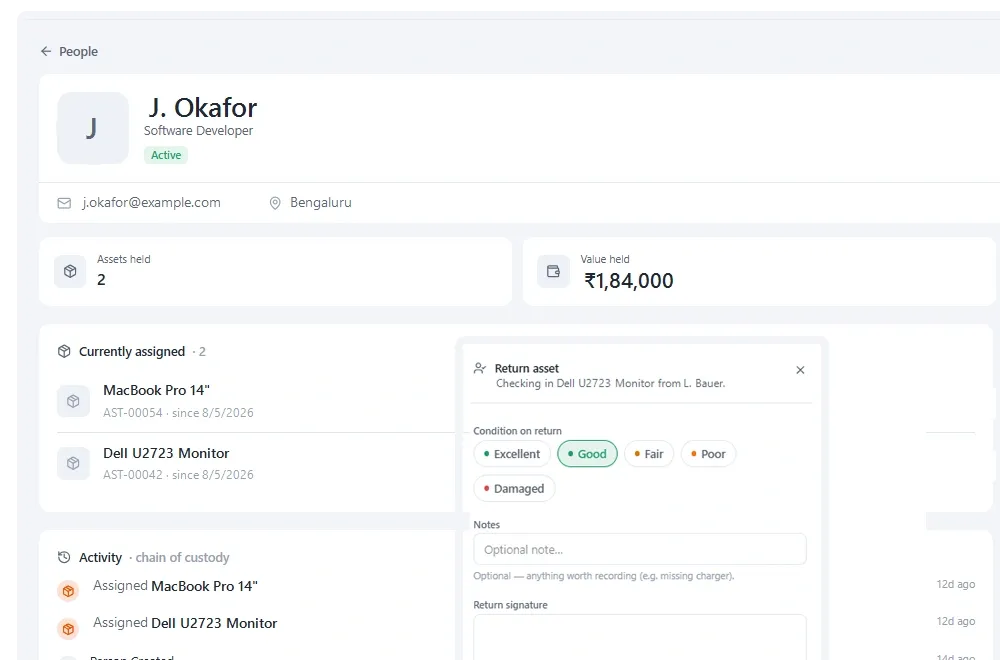
*The offboarding list. For a small business this one view is often the whole return on the exercise.*
Common small-business mistakes
Tagging everything before using anything
The project becomes a tagging exercise, everyone gets bored around item 60, and the system never gets used for its actual purpose. Tag the movers, start issuing, tag the rest opportunistically.
Building a location hierarchy for a business you might become
Four locations is fine. You can add more the day you need them, and a deep hierarchy for thirty people makes every entry slower for no benefit.
Letting one person own it entirely
Understandable at small scale, and it's how you get a register that's accurate right up until that person is on holiday. Make sure at least two people can issue and record.
Skipping the accessories
Covered above but worth repeating, because it's the one everybody does. Chargers, docks, cables and adaptors don't feel like company property, and that's exactly why they don't come back.
Who should own this in a small business
In a thirty-person business there is no asset manager, and the honest answer is that it lands on whoever is most organised — usually office management, operations, or whoever ended up running IT.
Two things make that sustainable rather than a burden on one person:
- More than one person can issue and record. If only the owner can, the register is wrong every time they are out. This is the single strongest argument against per-seat pricing at small scale.
- The owner's job is the process, not the data entry. They decide what gets tracked and check accuracy occasionally. Everyone who hands equipment over records it.
Growing into it
|
Size |
What changes |
What to add |
|---|---|---|
|
Under 20 people |
One office, informal |
Register, named holders, warranty dates |
|
20–50 |
Remote staff, some field work |
Signatures, offboarding list, a second recorder |
|
50–150 |
Multiple locations or teams |
Departments, locations hierarchy, bookings if sharing starts |
|
150+ |
Someone owns this properly |
Roles and permissions, scheduled counts, API if other systems need the data |
The mistake is buying for the size you hope to be. Each row is a response to a problem you will actually have, and adding capability before the problem exists just makes the system harder to use today.
What good looks like after three months
|
Signal |
What it means |
|---|---|
|
Anyone can say who holds any item |
Custody is being recorded at the moment it happens |
|
Nobody has asked 'where is the spreadsheet' |
The register has become the single source |
|
A leaver was offboarded from a list |
The highest-value use is working |
|
A warranty reminder was actioned |
The system is giving back rather than just storing |
|
Two people have issued equipment this month |
It isn't one person's private system |
If three of those are true at three months, it's embedded. If none are, the problem isn't the tool — it's that recording a movement is still harder than not bothering.
Do you need to pay for anything?
Not immediately, and I'd rather you didn't until you know. Several tools including ours have a free tier that will comfortably hold a small estate, and running a real checkout on it for a month tells you more than any evaluation matrix.
The point at which paying makes sense is usually one of three: you want signed handovers, two teams keep clashing over the same equipment, or somebody outside the business has asked you to prove what you own. Before that, free is genuinely enough.
Key takeaways
- Track what moves and what you'd notice gone — including cheap accessories, which are the most commonly unreturned.
- Don't build a location hierarchy you don't need; office, store and home covers most small businesses.
- Skip custom fields, approvals, bookings and integrations until something specific requires them.
- The four practices that matter: named holder, signature at handover, offboarding list, warranty reminder.
- Start on a free tier and pay only when signed custody, clashes or external assurance make it necessary.
Frequently asked questions
What is the best asset management software for a small business?
One with a genuine free tier and no per-user charge, so everyone who handles equipment can record it. Beyond that, prioritise how fast a record can be updated on a phone over feature count — at small scale, adoption is the only thing that determines whether the register stays accurate.
How do small businesses track equipment?
Most effectively with QR labels scanned on a phone, a named holder on anything portable, and a signature at handover. That covers the failure modes that actually occur at small scale without any of the process overhead designed for large estates.
Should a small business track low-value items like chargers?
Yes. They're the most commonly unreturned items precisely because they don't feel like company property. Individually trivial, collectively often larger than the expensive losses, and they cost nothing extra to register on a plan that doesn't charge per item.
How long does it take to set up asset tracking?
An afternoon for a small estate. Import whatever list you have, decide three or four locations, print and apply labels to the portable items, record who currently holds what, and set warranty dates. The walking around asking people is the slowest part.
Do we need asset management software at all?
If nothing is issued to anybody and items live in one place, probably not — a spreadsheet will do. The moment equipment starts changing hands, or somebody external asks you to prove what you own, that changes.
What is the cheapest way to track company equipment?
A spreadsheet, honestly, if items sit still and one person maintains it. Once equipment is issued to people, a free tier with unlimited users costs the same and records things a spreadsheet structurally cannot — acceptance, history, and dates that warn you.
How many assets before you need software?
It is not the count, it is the movement. Two hundred items in a store room are fine on a spreadsheet. Forty items changing hands weekly are not, because the spreadsheet cannot record who accepted what and cannot be updated where the equipment is.
Do we need to tag everything at once?
No, and trying is the most common reason these projects stall. Tag what moves and what you would notice missing. The rest can follow opportunistically, or never — a partial register in daily use beats a complete one nobody updates.