
Maintenance & CMMS
Stackroom vs UpKeep
UpKeep is a mobile-first CMMS built around work orders, preventive maintenance and technicians. Stackroom is built around custody: who has an item, where it is, and whether it came back. Both track assets; they are organised around different verbs.
Stackroom vs UpKeep: which should you choose?
UpKeep is the better choice if your problem is keeping equipment running — work orders, preventive maintenance schedules, technicians and downtime. Stackroom is the better choice if your problem is equipment moving between people and sites, where custody, signatures, bookings and audits matter more than work orders.
Side by side
Stackroom vs UpKeep: pricing, limits and features
Grouped so you can jump to the part you care about. Our figures come from our billing API, so they match the invoice.
Pricing & plans
Free plan
- Stackroom
- Free forever — 250 assets, 500 people, unlimited users, no card
- UpKeep
- None — free trial only (Free trial available)
Paid plans start at
- Stackroom
- $35/mo for Starter — published, self-serve
- UpKeep
- From the mid-twenties per licensed user per month, roughly doubling at the tier above, with the top two tiers quote-only.
How the bill scales
- Stackroom
- Capability and capacity — never headcount, never how much you track
- UpKeep
- Per user, per month — but only for users who do the work. Admins, technicians and limited technicians need licences; requesters, view-only users and third parties do not.
Limits
Asset limits
- Stackroom
- 250 free, up to 10,000 on Premium, custom on Enterprise
- UpKeep
- Not published as a cap
Users & seats
- Stackroom
- Unlimited on every plan, including Free — seats are never the meter
- UpKeep
- Every technical user is a paid licence; requesters and viewers are free
Locations & sites
- Stackroom
- 1 on Free, unlimited on every paid plan
- UpKeep
- Multi-site support is an Enterprise capability
How each tool is set up
Built around
- Stackroom
- Asset lifecycle & custody
- UpKeep
- Work orders & maintenance
Unlimited users
- Stackroom
- Yes
- UpKeep
- No
Custody & accountability
Signed handover & return, with PDF
- Stackroom
- Yes
- UpKeep
- No
Chain of custody history
- Stackroom
- Yes
- UpKeep
- No
Asset clearance certificate for leavers
- Stackroom
- Yes
- UpKeep
- No
Signed webhooks with retries
- Stackroom
- 41 events, HMAC-signed, retried
- UpKeep
- Not stated on their pricing page
Audits & compliance
Cycle-count audits with sign-off
- Stackroom
- Yes
- UpKeep
- No
Maintenance & service
Work orders & technician scheduling
- Stackroom
- Maintenance tickets
- UpKeep
- Its strength
Parts & spares inventory for repairs
- Stackroom
- No
- UpKeep
- Yes
Downtime & reliability reporting
- Stackroom
- No
- UpKeep
- Yes
AMC / CMC service contracts
- Stackroom
- Yes
- UpKeep
- Warranty tracking
Finance & lifecycle
Depreciation (SLM / WDV) & book value
- Stackroom
- Yes
- UpKeep
- Limited
Tracking & tagging
Bookings & reservations
- Stackroom
- Yes
- UpKeep
- No
Platform, API & AI
REST API
- Stackroom
- Pro and up — documented, published spec
- UpKeep
- Enterprise only
Built-in AI assistant
- Stackroom
- Stackroom AI — Starter and up
- UpKeep
- Nova AI, from the entry tier
| Capability | Stackroom | UpKeep |
|---|---|---|
| Pricing & plans | ||
| Free plan | Free forever — 250 assets, 500 people, unlimited users, no card | None — free trial only (Free trial available) |
| Paid plans start at | $35/mo for Starter — published, self-serve | From the mid-twenties per licensed user per month, roughly doubling at the tier above, with the top two tiers quote-only. |
| How the bill scales | Capability and capacity — never headcount, never how much you track | Per user, per month — but only for users who do the work. Admins, technicians and limited technicians need licences; requesters, view-only users and third parties do not. |
| Limits | ||
| Asset limits | 250 free, up to 10,000 on Premium, custom on Enterprise | Not published as a cap |
| Users & seats | Unlimited on every plan, including Free — seats are never the meter | Every technical user is a paid licence; requesters and viewers are free |
| Locations & sites | 1 on Free, unlimited on every paid plan | Multi-site support is an Enterprise capability |
| How each tool is set up | ||
| Built around | Asset lifecycle & custody | Work orders & maintenance |
| Unlimited users | Yes | No |
| Custody & accountability | ||
| Signed handover & return, with PDF | Yes | No |
| Chain of custody history | Yes | No |
| Asset clearance certificate for leavers | Yes | No |
| Signed webhooks with retries | 41 events, HMAC-signed, retried | Not stated on their pricing page |
| Audits & compliance | ||
| Cycle-count audits with sign-off | Yes | No |
| Maintenance & service | ||
| Work orders & technician scheduling | Maintenance tickets | Its strength |
| Parts & spares inventory for repairs | No | Yes |
| Downtime & reliability reporting | No | Yes |
| AMC / CMC service contracts | Yes | Warranty tracking |
| Finance & lifecycle | ||
| Depreciation (SLM / WDV) & book value | Yes | Limited |
| Tracking & tagging | ||
| Bookings & reservations | Yes | No |
| Platform, API & AI | ||
| REST API | Pro and up — documented, published spec | Enterprise only |
| Built-in AI assistant | Stackroom AI — Starter and up | Nova AI, from the entry tier |
Honest take: UpKeep leads decisively on maintenance management. Stackroom leads on custody, location and accountability. The right question is whether your equipment mostly breaks or mostly walks.
UpKeep capabilities verified September 2026 · plan facts read from their pricing page , September 2026. Spotted something out of date? Tell us.
Plan gating
Which tier unlocks what
What you have to be paying for before each capability is available.
- CSV / XLSX importStarter and up
- Barcode & QR scanningStarter and up
- Bookings & reservationsStarter and up
- Maintenance & serviceStarter and up
- Cycle-count auditsGrowth and up
- Report libraryGrowth and up
- Custom fieldsGrowth and up
- Stackroom AIFree and up
- REST APIGrowth and up
- Signed webhooksGrowth and up
- Custom rolesGrowth and up
- Google / Microsoft SSOFree and up
- API access and custom integrations — Enterprise only
- Single sign-on and custom roles — Enterprise only
- Purchase orders and workflow automation — Enterprise only
- Multi-site support — Enterprise only
- Preventive maintenance and checklists — second tier and above
- Mobile offline mode and signature capture — third tier and above
CMMS pricing counts technicians, which is reasonable when technicians are the users. It fits badly when the people touching equipment are teams, not maintainers.
The difference
What Stackroom and UpKeep are each built to do
Both have assets. They are organised around different verbs
In a CMMS, the asset exists so that work can be raised against it. The question the system is built to answer is “what needs doing, by whom, and when was it last done”. UpKeep answers that well, on a phone, which is why it has done well with maintenance teams.
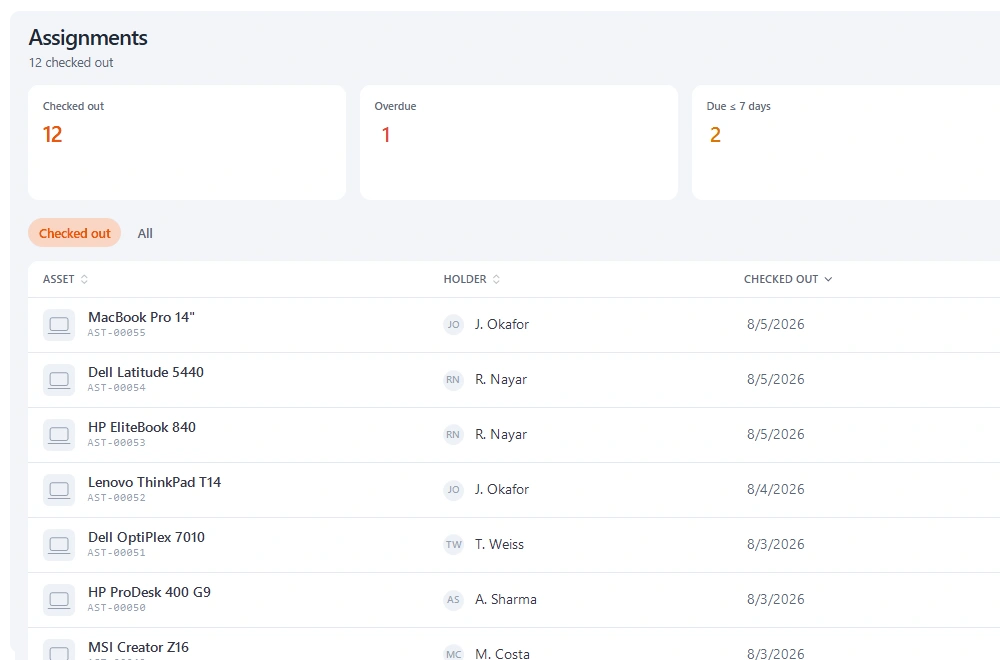
In Stackroom the asset exists because someone is holding it. The question is “who has this, since when, where was it last seen, and did it come back in one piece”. Maintenance is present — tickets, schedules, warranty, service history — but it is a supporting workflow rather than the centre.
This is why a feature-by-feature comparison misleads here. Both rows say “preventive maintenance” and both are telling the truth, but UpKeep's is a maintenance management system and ours is a scheduler that keeps equipment serviceable.
A test that decides it quickly
Ask what actually goes wrong with your equipment. If the answer is breakdowns, unplanned downtime, missed servicing and parts not being on the shelf — that is maintenance, and a CMMS is the right category. Stackroom will feel thin.
If the answer is that things disappear, come back damaged with nobody accountable, get double-booked, or cannot be found when needed — that is custody, and a CMMS will feel thin because it has no concept of a person holding something temporarily.
Most organisations have some of both. The one that costs you more this year should decide the purchase.
What a CMMS structurally lacks
No custody chain. A CMMS knows an asset's location, not that Marcus signed for it on Tuesday and still has it. That distinction is the entire point of an accountability system.
No reservations. Work orders are scheduled against technicians, not equipment availability for other people. Two teams wanting the same item next week is outside the model.
No cycle counts. Maintenance reconciles against a work history, not a physical count with a scope and a signature. When finance or an insurer asks for an inventory, a CMMS has nothing shaped like an answer.
Where Stackroom's maintenance genuinely reaches
Being honest about our own boundary: Stackroom does tickets with statuses, costs and a full service history; recurring schedules that raise work ahead of the date; warranty dates with reminders; and an asset held out of the bookable pool while a ticket is open.
What it does not do is parts inventory for repairs, technician workload management, downtime and reliability analytics, or meter-based triggers. If you need those, you need a CMMS, and running both is a reasonable answer — Stackroom's webhooks can raise work in another system when a fault is recorded.
Why teams switch
What we hear from teams leaving UpKeep
The problem was disappearance, not downtime
A work-order system has no answer for a laptop that left with somebody, because nothing was ever wrong with it.
The people issuing equipment were not technicians
Per-technician pricing does not extend to an office manager or an IT coordinator, so the people who actually hand equipment over end up with no access at all.
Someone asked for a count
Insurers, auditors and finance want a physical inventory with a signature. A maintenance history is not that document.
The other side
When UpKeep is the better choice
We would rather you picked the right tool than picked ours.
- Your primary problem is equipment reliability, downtime and planned maintenance.
- You have a maintenance team with technicians who need work-order assignment and scheduling.
- You need parts inventory tied to repairs.
- You need downtime, MTBF or reliability reporting.
Switching
Moving from UpKeep
- 1
Export from UpKeep
Take a full CSV or XLSX export of your asset list, including serial numbers, categories, locations and any custom fields you rely on. Export your people list separately if UpKeep keeps one.
- 2
Map the columns once
The importer previews your file and lets you map each column to a Stackroom field. Categories, locations and departments are created from the values in your file, so you do not build the hierarchy by hand first.
- 3
Import people, then assets
Loading people first means custody assignments resolve to a real person on the asset import rather than needing a second pass.
- 4
Check a sample, then go
Spot-check twenty records against the old system before you invite the team. Re-importing is safe — matching on an existing code updates rather than duplicates.
Nothing is deleted from UpKeep by importing into Stackroom, so you can run both in parallel for a week while people get used to the change.
FAQ
Questions, answered
Is Stackroom a CMMS?
No. Stackroom has maintenance tickets, recurring schedules, warranty reminders and a full service history, but no parts inventory for repairs, technician workload management or reliability analytics. For a real maintenance operation, use a CMMS.
Can we run both?
Yes, and for organisations that both lend equipment and maintain it, that is often the right answer. Stackroom's webhooks can raise work in another system when a fault is recorded on check-in.
We have preventive maintenance needs but no maintenance team. Which one?
Probably Stackroom. Recurring schedules and warning reminders cover scheduled servicing and statutory inspections. A CMMS becomes worth it once someone's job title is maintenance.
Does UpKeep track who has equipment?
It records asset location and can assign to technicians, but it does not model temporary custody by an arbitrary person with a signed handover and a return. That is the structural gap.
Can we import our data from UpKeep?
Yes. Export your inventory to CSV and import it into Stackroom. Categories, locations and custom fields map across, and our team will help with the awkward parts of a larger migration.
How long does switching actually take?
Most teams import in the morning and run a real checkout the same afternoon. There is no implementation project and no professional services fee. The longest part is usually relabelling, and that can be done gradually.
Do we have to relabel everything?
No. If your existing labels carry a code you already track, import that code and keep using them. New QR labels can be printed on standard address stock as and when you need them.
Is UpKeep free?
No. UpKeep has no free plan, only a free trial — free trial available. Stackroom has a permanent free plan with unlimited users and no card required.
How is UpKeep priced compared with Stackroom?
Per user, per month — but only for users who do the work. Admins, technicians and limited technicians need licences; requesters, view-only users and third parties do not. Stackroom prices on capability and capacity instead: users are unlimited on every plan, and tracking more equipment never moves the bill on its own.
What are the UpKeep asset and user limits?
Assets: Not published as a cap. Users: Every technical user is a paid licence; requesters and viewers are free. Locations: Multi-site support is an Enterprise capability. Every Stackroom limit is published on our pricing page and served from our billing API, so it matches your invoice.
Other comparisons
Looking at something else?
Outgrowing UpKeep?
Import your data, print a sheet of labels, and run a real checkout the same day.