
Equipment tracking & checkout
Stackroom vs Cheqroom
Cheqroom is well built for equipment checkout, particularly in media and education. Stackroom covers the same checkout workflow and adds maintenance, warranty and cycle-count audits, priced on your team rather than per administrator.
Stackroom vs Cheqroom: which should you choose?
Cheqroom is the better choice for pure equipment checkout in media and education, where its booking experience is excellent. Stackroom covers the same checkout workflow and adds maintenance tickets, warranty reminders and phone-based audits, and prices on your team rather than per user.
Side by side
Stackroom vs Cheqroom: pricing, limits and features
Grouped so you can jump to the part you care about. Our figures come from our billing API, so they match the invoice.
Pricing & plans
Free plan
- Stackroom
- Free forever — 250 assets, 500 people, unlimited users, no card
- Cheqroom
- None
Paid plans start at
- Stackroom
- $35/mo for Starter — published, self-serve
- Cheqroom
- Priced per admin per month billed annually, from a three-admin floor — so the smallest possible bill is three seats even for a small team.
How the bill scales
- Stackroom
- Capability and capacity — never headcount, never how much you track
- Cheqroom
- Administrator count, with a three-admin minimum. Items and non-admin users are unlimited, so the bill tracks how many people administer the system rather than how much you track.
Limits
Asset limits
- Stackroom
- 250 free, up to 10,000 on Premium, custom on Enterprise
- Cheqroom
- Unlimited items on every plan
Users & seats
- Stackroom
- Unlimited on every plan, including Free — seats are never the meter
- Cheqroom
- Unlimited users; admins are the billable seat, minimum 3
Locations & sites
- Stackroom
- 1 on Free, unlimited on every paid plan
- Cheqroom
- Not published as a cap
Custody & accountability
Equipment checkout & reservations
- Stackroom
- Yes
- Cheqroom
- Its strength
Signed handover & return, with PDF
- Stackroom
- Yes
- Cheqroom
- Yes
Return with condition capture
- Stackroom
- Yes
- Cheqroom
- Yes
Asset clearance certificate for leavers
- Stackroom
- Yes
- Cheqroom
- No
Signed webhooks with retries
- Stackroom
- 41 events, HMAC-signed, retried
- Cheqroom
- Not stated on their pricing page
Audits & compliance
Cycle-count audits with sign-off
- Stackroom
- Yes
- Cheqroom
- Basic
Maintenance & service
Maintenance tickets with cost & history
- Stackroom
- Yes
- Cheqroom
- Light
AMC / CMC service contracts
- Stackroom
- Yes
- Cheqroom
- No
Finance & lifecycle
Depreciation (SLM / WDV) & book value
- Stackroom
- Yes
- Cheqroom
- No
Report library
- Stackroom
- 62 templates
- Cheqroom
- Standard reports
Tracking & tagging
Geo scan map & per-asset trail
- Stackroom
- Yes
- Cheqroom
- No
Booking calendar polish
- Stackroom
- Solid
- Cheqroom
- Its strength
Platform, API & AI
REST API
- Stackroom
- Pro and up — documented, published spec
- Cheqroom
- Not stated on their pricing page
Built-in AI assistant
- Stackroom
- Stackroom AI — Starter and up
- Cheqroom
- Not stated on their pricing page
| Capability | Stackroom | Cheqroom |
|---|---|---|
| Pricing & plans | ||
| Free plan | Free forever — 250 assets, 500 people, unlimited users, no card | None |
| Paid plans start at | $35/mo for Starter — published, self-serve | Priced per admin per month billed annually, from a three-admin floor — so the smallest possible bill is three seats even for a small team. |
| How the bill scales | Capability and capacity — never headcount, never how much you track | Administrator count, with a three-admin minimum. Items and non-admin users are unlimited, so the bill tracks how many people administer the system rather than how much you track. |
| Limits | ||
| Asset limits | 250 free, up to 10,000 on Premium, custom on Enterprise | Unlimited items on every plan |
| Users & seats | Unlimited on every plan, including Free — seats are never the meter | Unlimited users; admins are the billable seat, minimum 3 |
| Locations & sites | 1 on Free, unlimited on every paid plan | Not published as a cap |
| Custody & accountability | ||
| Equipment checkout & reservations | Yes | Its strength |
| Signed handover & return, with PDF | Yes | Yes |
| Return with condition capture | Yes | Yes |
| Asset clearance certificate for leavers | Yes | No |
| Signed webhooks with retries | 41 events, HMAC-signed, retried | Not stated on their pricing page |
| Audits & compliance | ||
| Cycle-count audits with sign-off | Yes | Basic |
| Maintenance & service | ||
| Maintenance tickets with cost & history | Yes | Light |
| AMC / CMC service contracts | Yes | No |
| Finance & lifecycle | ||
| Depreciation (SLM / WDV) & book value | Yes | No |
| Report library | 62 templates | Standard reports |
| Tracking & tagging | ||
| Geo scan map & per-asset trail | Yes | No |
| Booking calendar polish | Solid | Its strength |
| Platform, API & AI | ||
| REST API | Pro and up — documented, published spec | Not stated on their pricing page |
| Built-in AI assistant | Stackroom AI — Starter and up | Not stated on their pricing page |
Honest take: Cheqroom leads on a polished, focused checkout experience. Stackroom covers checkout plus maintenance, warranty and audit, without per-seat pricing pressure.
Cheqroom capabilities verified September 2026 · plan facts read from their pricing page , September 2026. Spotted something out of date? Tell us.
Plan gating
Which tier unlocks what
What you have to be paying for before each capability is available.
- CSV / XLSX importStarter and up
- Barcode & QR scanningStarter and up
- Bookings & reservationsStarter and up
- Maintenance & serviceStarter and up
- Cycle-count auditsGrowth and up
- Report libraryGrowth and up
- Custom fieldsGrowth and up
- Stackroom AIFree and up
- REST APIGrowth and up
- Signed webhooksGrowth and up
- Custom rolesGrowth and up
- Google / Microsoft SSOFree and up
- Work order workflows, RFID, room management and consumables sit in higher tiers
- The booking portal is a higher-tier capability
Per-user pricing is the single most common reason teams tell us they looked elsewhere: it creates pressure to limit who can administer the system, which concentrates the work on one person.
The difference
What Stackroom and Cheqroom are each built to do
Both tools do checkout well — the difference is what happens afterwards
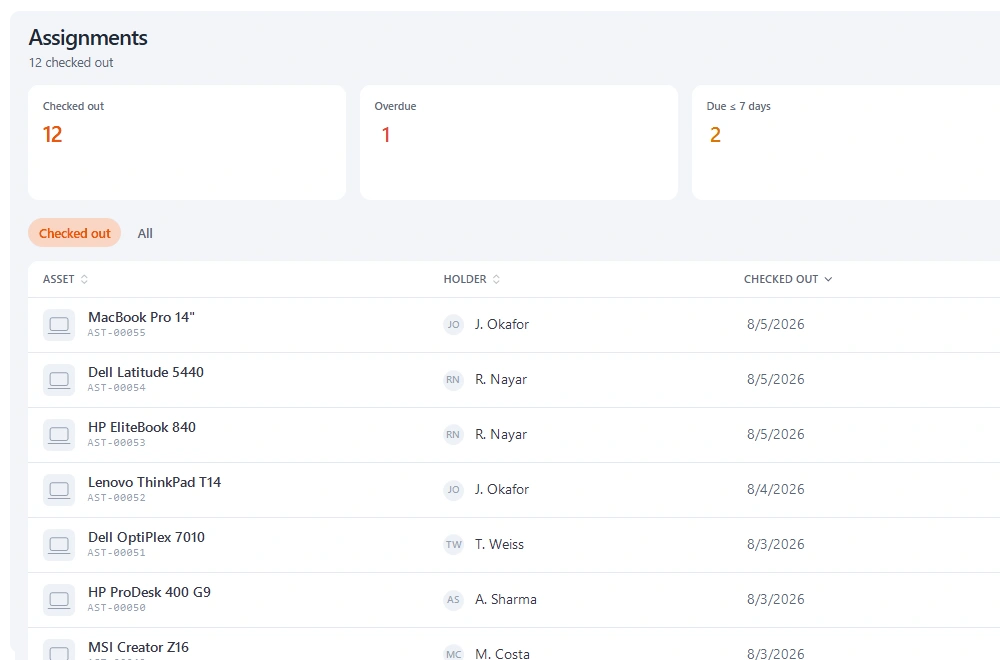
Reserve, check out with condition capture, check back in. Cheqroom does this cleanly and so does Stackroom, and anyone moving between them will recognise the workflow immediately. If checkout is the whole of your problem, this comparison is close and you should pick on feel.
The divergence starts once equipment needs servicing. A checkout tool's natural boundary is the loan: it knows the item went out and came back, and often records what condition it came back in. What it usually does not do is turn “came back damaged” into a tracked repair with a cost, an expected return date, and a history you can read two years later when deciding whether to replace the item.
In Stackroom that return is one action. Flagging a condition on check-in can open a maintenance ticket, which holds the asset out of the bookable pool until it is resolved, so the next team cannot reserve something that is sitting on a bench in pieces. Warranty dates live on the same record, so the first question on any repair — is this still covered — is answered without opening a filing cabinet.
Per-user pricing changes how a system gets used
This is a structural difference rather than a feature one, and it has more effect on day-to-day life than most feature rows. When each additional operator has a price, organisations ration operators. The usual result is one person who does all the issuing, which works until they are on leave.
Stackroom prices on the organisation. Every plan includes unlimited users, so a warehouse supervisor, three team leads and the person covering reception can all issue equipment without a procurement conversation. Whether that matters to you depends entirely on how many hands touch your gear.
The other half of the same point: Stackroom does not price on item count either. Registering the cheap items — the cables, the batteries, the hand tools that quietly disappear — costs nothing extra, and those are precisely the items an item-capped register tends to exclude.
Audits are a separate workflow, and most checkout tools do not have one
Checking gear out and counting gear are different jobs. Checkout answers “where should this be”; an audit answers “where is it actually”. Teams with a good checkout system are often still doing the annual count on a clipboard, because the checkout tool has no concept of a count as a distinct exercise with a start, a scope, a set of results and a sign-off.
Stackroom's cycle counts run from a phone. You scope a count to a location or category, walk it scanning, and each item is recorded verified or missing as you go. Closing the count captures a signature and a note, and the result is a document you can hand to finance or an auditor. Discrepancies stay attached to the assets, so the follow-up is a list rather than a memory.
Where the scan map matters
Every Stackroom scan records a location if the device offers one, which accumulates into a map and a per-asset trail. For a single studio with a cage, that is a curiosity. For gear that moves between venues, sites or vehicles, it is the difference between “it was signed out to Dan three weeks ago” and “it was last seen at the Leeds site on Tuesday morning”.
Cheqroom does not offer an equivalent. If your equipment lives in one building, you will not miss it.
Why teams switch
What we hear from teams leaving Cheqroom
Adding operators got expensive
Per-user pricing creates pressure to limit who can administer the system, which concentrates the work on one person and creates a bottleneck the moment they take a day off.
Servicing lived somewhere else
Checkout tools often stop at the loan. Warranty dates and service intervals then live in a spreadsheet alongside, which is exactly the fragmentation the tool was meant to remove.
Audits were still manual
Counting stock is a different workflow from checking equipment out. Teams switch when the annual count is still a clipboard exercise despite having a checkout system they otherwise like.
The other side
When Cheqroom is the better choice
We would rather you picked the right tool than picked ours.
- Your workflow is checkout and reservations, full stop, and you want the most polished version of exactly that.
- You are a media or education team already using Cheqroom happily — it is strong in both, and switching for its own sake is rarely worth it.
- You depend on Cheqroom's kit-grouping, where several items are bundled and issued as a single unit. Stackroom handles multi-item checkouts and bookings, but does not model a saved bundle as a first-class object.
- Your team is small enough that per-user pricing is cheaper than a flat team plan. Do the arithmetic rather than assuming.
Switching
Moving from Cheqroom
- 1
Export from Cheqroom
Take a full CSV or XLSX export of your asset list, including serial numbers, categories, locations and any custom fields you rely on. Export your people list separately if Cheqroom keeps one.
- 2
Map the columns once
The importer previews your file and lets you map each column to a Stackroom field. Categories, locations and departments are created from the values in your file, so you do not build the hierarchy by hand first.
- 3
Import people, then assets
Loading people first means custody assignments resolve to a real person on the asset import rather than needing a second pass.
- 4
Check a sample, then go
Spot-check twenty records against the old system before you invite the team. Re-importing is safe — matching on an existing code updates rather than duplicates.
Nothing is deleted from Cheqroom by importing into Stackroom, so you can run both in parallel for a week while people get used to the change.
FAQ
Questions, answered
Will we lose the checkout workflow our team knows?
No. Reserve, check out with condition capture, and check back in works the same way, including signatures. The differences are additive: maintenance tickets, warranty reminders and phone-based audits.
Does Stackroom handle items that always travel together?
Several items can be issued or booked in one action against one holder, so a full rig goes out together and comes back together. What Stackroom does not do today is save that grouping as a reusable named bundle you pick in one click — if that specific behaviour is central to your load-out process, Cheqroom does it better.
Can students or team request equipment themselves?
Yes. Requests go to whoever holds the approval permission, with a notification, and the approval creates the custody record. You can also allow direct checkout without approval for lower-value categories.
How does condition tracking differ?
Both capture condition at checkout and return. Stackroom keeps condition as a field on the asset with its own history, so you can see an item degrade over time and across holders rather than reading individual loan records.
Can we import our data from Cheqroom?
Yes. Export your inventory to CSV and import it into Stackroom. Categories, locations and custom fields map across, and our team will help with the awkward parts of a larger migration.
How long does switching actually take?
Most teams import in the morning and run a real checkout the same afternoon. There is no implementation project and no professional services fee. The longest part is usually relabelling, and that can be done gradually.
Do we have to relabel everything?
No. If your existing labels carry a code you already track, import that code and keep using them. New QR labels can be printed on standard address stock as and when you need them.
Is Cheqroom free?
No. Cheqroom has no free plan. Stackroom has a permanent free plan with unlimited users and no card required.
How is Cheqroom priced compared with Stackroom?
Administrator count, with a three-admin minimum. Items and non-admin users are unlimited, so the bill tracks how many people administer the system rather than how much you track. Stackroom prices on capability and capacity instead: users are unlimited on every plan, and tracking more equipment never moves the bill on its own.
What are the Cheqroom asset and user limits?
Assets: Unlimited items on every plan. Users: Unlimited users; admins are the billable seat, minimum 3. Locations: Not published as a cap. Every Stackroom limit is published on our pricing page and served from our billing API, so it matches your invoice.
Other comparisons
Looking at something else?
Outgrowing Cheqroom?
Import your data, print a sheet of labels, and run a real checkout the same day.