
IT asset management
Stackroom vs Lansweeper
Lansweeper is an excellent network discovery and IT inventory platform: it finds what is on your network and tells you what is installed on it, automatically. Stackroom tracks the physical side — who is holding which item, where it is, and whether it came back.
Stackroom vs Lansweeper: which should you choose?
Lansweeper and Stackroom answer different questions and are not really substitutes. Lansweeper scans your network and tells you what devices exist and what software runs on them. Stackroom tracks physical custody: who has an item, where it was last scanned, and whether it was returned. Many organisations run both.
Side by side
Stackroom vs Lansweeper: pricing, limits and features
Grouped so you can jump to the part you care about. Our figures come from our billing API, so they match the invoice.
Pricing & plans
Free plan
- Stackroom
- Free forever — 250 assets, 500 people, unlimited users, no card
- Lansweeper
- 100 licensed assets. Scanning itself is uncapped, but anything past the first 100 shows only basic details rather than a full scan.
Paid plans start at
- Stackroom
- $35/mo for Starter — published, self-serve
- Lansweeper
- The first paid band covers 2,000 assets; the tier above scales to 9,000; Enterprise starts at 10,000.
How the bill scales
- Stackroom
- Capability and capacity — never headcount, never how much you track
- Lansweeper
- Licensed asset count, in bands. Beyond the entry tiers, Enterprise scales in increments of 2,000 assets.
Limits
Asset limits
- Stackroom
- 250 free, up to 10,000 on Premium, custom on Enterprise
- Lansweeper
- 100 free · 2,000 · up to 9,000 · 10,000+ in 2,000-asset bands
Users & seats
- Stackroom
- Unlimited on every plan, including Free — seats are never the meter
- Lansweeper
- Not published as a licensing dimension
Locations & sites
- Stackroom
- 1 on Free, unlimited on every paid plan
- Lansweeper
- Not published as a licensing dimension
What each tool covers
Equipment that never touches a network
- Stackroom
- Any asset type
- Lansweeper
- Manual entry
Custody & accountability
Signed handover & return, with PDF
- Stackroom
- Yes
- Lansweeper
- No
Chain of custody history
- Stackroom
- Yes
- Lansweeper
- Basic assignment
Asset clearance certificate for leavers
- Stackroom
- Yes
- Lansweeper
- No
Signed webhooks with retries
- Stackroom
- 41 events, HMAC-signed, retried
- Lansweeper
- Not stated on their pricing page
Audits & compliance
Cycle-count audits with sign-off
- Stackroom
- Yes
- Lansweeper
- No
Maintenance & service
AMC / CMC service contracts
- Stackroom
- Yes
- Lansweeper
- Warranty data
Finance & lifecycle
Depreciation (SLM / WDV) & book value
- Stackroom
- Yes
- Lansweeper
- Limited
Tracking & tagging
Automated network discovery
- Stackroom
- No
- Lansweeper
- Its strength
Geo scan map & per-asset trail
- Stackroom
- Yes
- Lansweeper
- No
Platform, API & AI
Installed software inventory
- Stackroom
- No
- Lansweeper
- Its strength
Vulnerability & patch insight
- Stackroom
- No
- Lansweeper
- Yes
REST API
- Stackroom
- Pro and up — documented, published spec
- Lansweeper
- Not stated on their pricing page
Built-in AI assistant
- Stackroom
- Stackroom AI — Starter and up
- Lansweeper
- Not stated on their pricing page
| Capability | Stackroom | Lansweeper |
|---|---|---|
| Pricing & plans | ||
| Free plan | Free forever — 250 assets, 500 people, unlimited users, no card | 100 licensed assets. Scanning itself is uncapped, but anything past the first 100 shows only basic details rather than a full scan. |
| Paid plans start at | $35/mo for Starter — published, self-serve | The first paid band covers 2,000 assets; the tier above scales to 9,000; Enterprise starts at 10,000. |
| How the bill scales | Capability and capacity — never headcount, never how much you track | Licensed asset count, in bands. Beyond the entry tiers, Enterprise scales in increments of 2,000 assets. |
| Limits | ||
| Asset limits | 250 free, up to 10,000 on Premium, custom on Enterprise | 100 free · 2,000 · up to 9,000 · 10,000+ in 2,000-asset bands |
| Users & seats | Unlimited on every plan, including Free — seats are never the meter | Not published as a licensing dimension |
| Locations & sites | 1 on Free, unlimited on every paid plan | Not published as a licensing dimension |
| What each tool covers | ||
| Equipment that never touches a network | Any asset type | Manual entry |
| Custody & accountability | ||
| Signed handover & return, with PDF | Yes | No |
| Chain of custody history | Yes | Basic assignment |
| Asset clearance certificate for leavers | Yes | No |
| Signed webhooks with retries | 41 events, HMAC-signed, retried | Not stated on their pricing page |
| Audits & compliance | ||
| Cycle-count audits with sign-off | Yes | No |
| Maintenance & service | ||
| AMC / CMC service contracts | Yes | Warranty data |
| Finance & lifecycle | ||
| Depreciation (SLM / WDV) & book value | Yes | Limited |
| Tracking & tagging | ||
| Automated network discovery | No | Its strength |
| Geo scan map & per-asset trail | Yes | No |
| Platform, API & AI | ||
| Installed software inventory | No | Its strength |
| Vulnerability & patch insight | No | Yes |
| REST API | Pro and up — documented, published spec | Not stated on their pricing page |
| Built-in AI assistant | Stackroom AI — Starter and up | Not stated on their pricing page |
Honest take: Lansweeper leads decisively on automated discovery and software inventory. Stackroom leads on physical custody, non-networked equipment and field workflows. These are complementary rather than competing.
Lansweeper capabilities verified September 2026 · plan facts read from their pricing page , September 2026. Spotted something out of date? Tell us.
Plan gating
Which tier unlocks what
What you have to be paying for before each capability is available.
- CSV / XLSX importStarter and up
- Barcode & QR scanningStarter and up
- Bookings & reservationsStarter and up
- Maintenance & serviceStarter and up
- Cycle-count auditsGrowth and up
- Report libraryGrowth and up
- Custom fieldsGrowth and up
- Stackroom AIFree and up
- REST APIGrowth and up
- Signed webhooksGrowth and up
- Custom rolesGrowth and up
- Google / Microsoft SSOFree and up
- Full scan detail is itself the gate — unlicensed assets are discovered but not detailed
Comparing these prices directly is misleading, because they are buying different things. Compare each against the problem it solves.
The difference
What Stackroom and Lansweeper are each built to do
These tools answer different questions
Lansweeper's question is “what is on our network and what is running on it”. It answers that automatically, continuously and in more detail than any manual process could. For patch posture, licence compliance and security visibility, it is a strong tool and Stackroom is not an alternative to it in any sense.
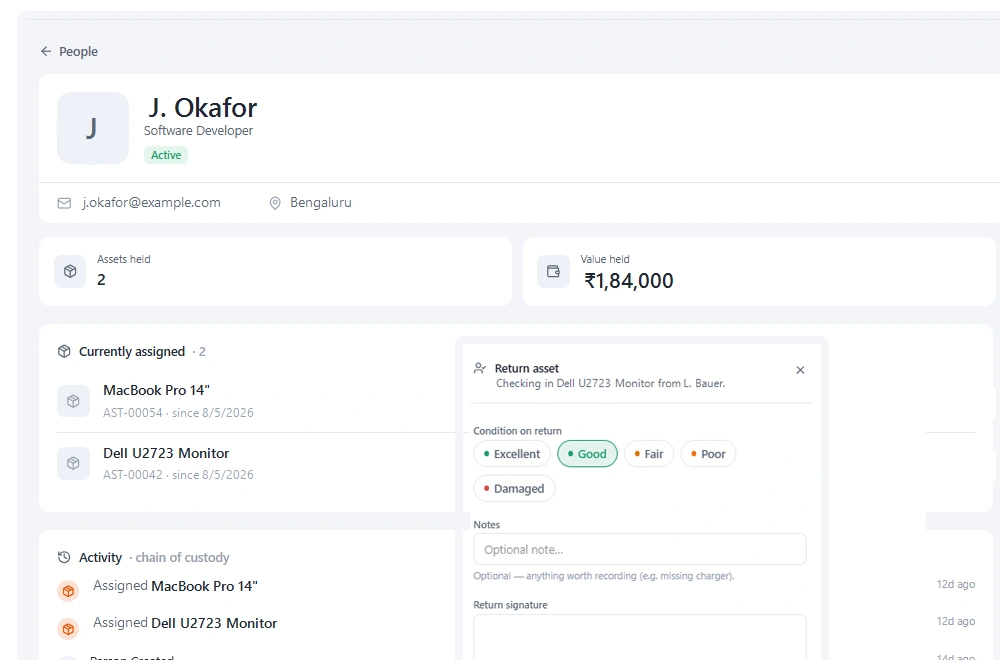
Stackroom's question is “who physically has this item and did it come back”. That question is invisible to a network scanner, because the answer changes when someone picks something up — an event that generates no network traffic at all.
A laptop that has been in a drawer for six weeks looks identical to a discovery tool and a scanner, because it is not on the network either way. Stackroom knows it was signed out to a leaver in August and never returned.
Everything that never touches a network
Discovery tools have a hard boundary: if it does not connect, it does not exist. That excludes a great deal of what organisations actually lose — monitors, docks, adaptors, headsets, test equipment, tools, cameras, staging, keys, PPE.
In most organisations that non-networked tail is both larger and more mobile than the networked estate, and it is where quiet losses accumulate. Stackroom registers it, tags it, and tracks custody on it with exactly the same workflow it uses for a laptop.
Where the overlap actually is
Both tools hold a device record, and that is the extent of the overlap. If your entire estate is networked and your only concern is knowing it exists and is patched, you do not need Stackroom.
The overlap becomes a gap at three moments: onboarding, when someone needs to be handed equipment and sign for it; offboarding, when someone needs to give it back and you need a list; and any time equipment is shared rather than assigned. Discovery tools have little to say about any of the three.
Running both is a normal answer
We would rather say this plainly than pretend to be a replacement. A common arrangement is Lansweeper for discovery and software posture, Stackroom for physical custody and everything that never appears on a network, with the two reconciled periodically.
Stackroom's REST API and webhooks make that reconciliation practical: assets can be created or updated programmatically from a discovery export, and custody events can be pushed out to whatever else needs to know.
Why teams switch
What we hear from teams leaving Lansweeper
Discovery could not see the drawer
A device that is off the network is invisible to a scanner. Custody records are how you find out that it left with someone in August.
Half the estate was not networked
Monitors, docks, headsets, tools and test equipment never appear in a discovery sweep, and they are where quiet losses accumulate.
Offboarding needed a list and a signature
Recovering equipment from a leaver is a physical process. It needs a list of what they hold and a record that they handed it back.
The other side
When Lansweeper is the better choice
We would rather you picked the right tool than picked ours.
- Your requirement is network discovery, software inventory or patch and vulnerability posture. Stackroom does none of these.
- Your estate is entirely networked and you have no physical custody problem to solve.
- You need automated hardware detail — CPU, memory, installed applications — without anyone entering it.
- Honestly: if you are choosing between the two for IT security visibility, choose Lansweeper.
Switching
Moving from Lansweeper
- 1
Export a device list from Lansweeper
A CSV of devices with serial numbers, models and current user is enough to seed the register. You are not replacing Lansweeper, you are adding a custody layer beside it.
- 2
Add what discovery never saw
Monitors, docks, adaptors, headsets, tools and test equipment. This is usually the larger half, and it is the half you were missing.
- 3
Tag and assign
Print QR labels, scan each item once to attach the label, and record who currently holds it. This is the pass that turns an inventory into a custody record.
- 4
Keep both, reconcile periodically
Use the REST API to push discovery updates into Stackroom so serial numbers and models stay accurate without anyone retyping them.
This is an addition rather than a migration. Lansweeper keeps doing what it does well; Stackroom covers what a network scan structurally cannot see.
FAQ
Questions, answered
Is Stackroom a replacement for Lansweeper?
No, and we would not claim it. Lansweeper discovers what is on your network and what software runs on it. Stackroom tracks physical custody and covers equipment that never touches a network. Many organisations run both.
Does Stackroom scan our network?
No. Assets are registered by import, by API or by scanning a QR label. There is no agent and no network discovery.
Can we feed Lansweeper data into Stackroom automatically?
Yes. The REST API accepts asset creation and updates, so a scheduled job can keep serial numbers, models and specifications current without manual entry.
We only have networked IT equipment. Do we need Stackroom?
Probably not for discovery. You might still want it for onboarding handovers, offboarding recovery and signed custody, which a scanner cannot provide — but that is a smaller case and we would rather you know that upfront.
Can we import our data from Lansweeper?
Yes. Export your inventory to CSV and import it into Stackroom. Categories, locations and custom fields map across, and our team will help with the awkward parts of a larger migration.
How long does switching actually take?
Most teams import in the morning and run a real checkout the same afternoon. There is no implementation project and no professional services fee. The longest part is usually relabelling, and that can be done gradually.
Do we have to relabel everything?
No. If your existing labels carry a code you already track, import that code and keep using them. New QR labels can be printed on standard address stock as and when you need them.
Is Lansweeper free?
100 licensed assets. Scanning itself is uncapped, but anything past the first 100 shows only basic details rather than a full scan. Stackroom's free plan is permanent rather than a trial, includes unlimited users, and needs no card.
How is Lansweeper priced compared with Stackroom?
Licensed asset count, in bands. Beyond the entry tiers, Enterprise scales in increments of 2,000 assets. Stackroom prices on capability and capacity instead: users are unlimited on every plan, and tracking more equipment never moves the bill on its own.
What are the Lansweeper asset and user limits?
Assets: 100 free · 2,000 · up to 9,000 · 10,000+ in 2,000-asset bands. Users: Not published as a licensing dimension. Locations: Not published as a licensing dimension. Every Stackroom limit is published on our pricing page and served from our billing API, so it matches your invoice.
Other comparisons
Looking at something else?
Outgrowing Lansweeper?
Import your data, print a sheet of labels, and run a real checkout the same day.